
Backing Track Generator
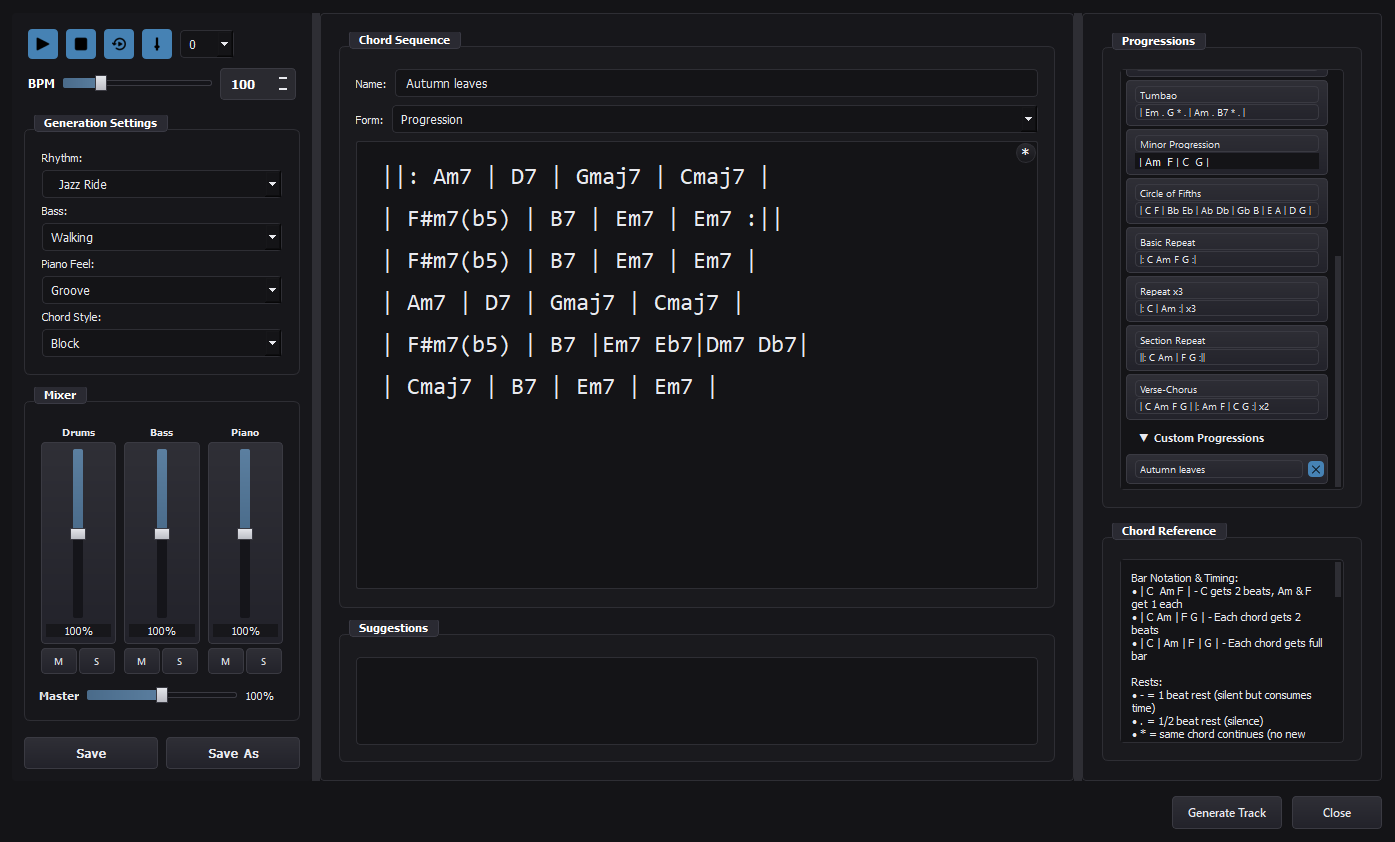
A great feature in Mingus, the Backing Track Generator allows you to write chord sequences or full songs in any key, and play them back in realtime.
Backing Tracks are created with piano, bass, and drums in multiple styles (Rock, Funk, Jazz, Latin, Reggae choices).
Simplicity is the key: just type (or paste)| Dm7 | G7 | Cmaj7 | Cmaj7 |
click PLAY, and your II–V–I track is grooving in Mingus.
The AI Collaboration Trick:
Go to your favourite AI agent, ask it to “print a text chord chart of Autumn Leaves in Gm” (or any song), copy the chart, paste it in Mingus, and you are ready to practice ANY song in seconds.
Transposition:
Quickly transpose any chart in the editor.
If you play a transposing instrument (such as Saxophone, Trumpet, etc…), Mingus makes things easy. Set the Global Transposition for your instrument, and the Backing Track Player will automatically generate transposed versions of the audio for you.
Nice and easy, no more wasting time finding chord versions for your transposing instrument.
More features:
You can save your chord progressions for future use, export songs as audio tracks, export Chord Charts as PDFs or text files, or import Text files directly into to the editor.